A subtitle file can look valid and still be out of sync
A subtitle file 2.5 seconds late scored the same as the in-sync one on our own check. Why a text check cannot see sync, and what the audio shows.
A subtitle file can be perfectly formed and still be wrong for the video.
We built one, broke its timing in several ways, and ran each version through our free subtitle check. The check found problems inside the file. It could not tell us whether the words appeared at the right moment.
SRT and VTT files hold timed text cues; we use “captions” and “subtitles” for them interchangeably. We built every file here ourselves, from a script we wrote and had read by text-to-speech. No user files or runs were used.
How captions go out of sync
A constant offset means every cue is early or late by the same amount. This can happen when someone trims an intro, adds a bumper, or uses captions made for another cut.
A stretch means the error grows through the video. A common cause is a frame-rate mismatch. The difference between 25 fps and 23.976 fps is 4.27%, or about 2.56 seconds per minute. The difference between 24 fps and 23.976 fps is 0.1%, or about 3.6 seconds per hour.
A jump partway through points to an edit or an inserted ad read: correct before it, wrong by a fixed amount after.
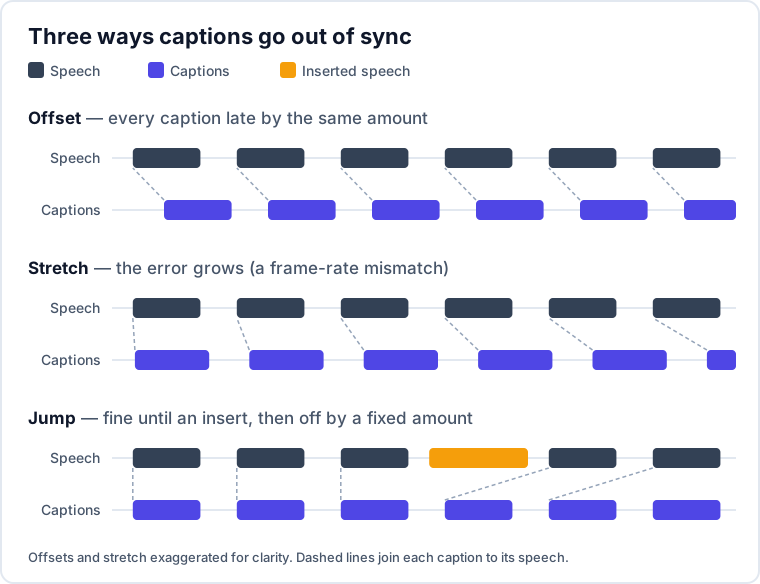
All three can leave a valid file: timestamps in order, no overlaps, normal reading speeds. It is internally consistent and still wrong for the video.
The experiment
On October 15, 2026, we ran this test on our production service.
The media was a talk we scripted about captions going wrong. It ran for 67.8 seconds and was read by text-to-speech. We also made an 88.6-second version with a 20-second ad read inserted at 0:37. The insert shifted everything after it 20.81 seconds later.
We first made rough captions with 36 cues, timed by word count rather than by listening. We repaired those captions against the original audio. That repaired file became our in-sync reference.
From the reference, we made an offset version shifted 2.5 seconds late, a version stretched by 25/23.976, and a version placed against the media containing the ad.
The free check that scored these files is ours. Its score is for each file as given. The other columns are the result of repairing that file against the audio.
| Captions | Free check score | Cues retimed | Average / largest correction | Quality |
|---|---|---|---|---|
| Rough, timed by word count | 3 | 36 of 36 | 0.64 s / 1.70 s | excellent |
| In sync (reference) | 8 | (not repaired — this is the target) | – | – |
| Reference shifted 2.5 s late | 8 | 36 of 36 | 2.53 s / 2.74 s | excellent |
| Reference stretched 25/23.976 | 6 | 36 of 36 | 1.56 s / 2.89 s | excellent |
| Reference against the ad version | 8 | 36 of 36 | 9.17 s / 20.92 s | excellent |
The in-sync file and the file shifted 2.5 seconds late both scored 8. The stretched file scored 6, better than the in-sync file, because stretching made its cues read more slowly.
The file that was 20.8 seconds late for everything after 0:37 also scored 8. In that case, the final cue moved from 66.68 seconds to 87.48 seconds. The true shift was 20.81 seconds.
The free check measures the subtitle file, not its sync with the media.
What a text-only check can see
Our free check reads only the subtitle file. Its score is the share of cues with at least one timing issue.
It flags:
- Reading speeds above 21 characters per second.
- Overlapping cues.
- Cues shorter than 0.5 seconds when they contain more than 5 characters.
- Cues longer than 7 seconds.
- Gaps longer than 10 seconds.
These checks can catch bad hand edits, awkward timing, and conversion problems. They cannot see a constant offset or a clean stretch because they have no audio reference.
After repair, every repaired file scored 8. In each file, 3 of 36 cues still read faster than 21 characters per second. There was no room to lengthen them before the next cue. The voice speaks about 200 words per minute, and making room would mean moving cues off their first spoken word.
Measuring sync against the audio
To measure sync, the repair transcribes the media with word-level timings and finds each cue’s words in that transcript. Matching tolerates small spelling differences and looks about 20 words past the last match.
When it finds a cue, it moves the cue to those spoken words. The start stays on the first word. The end is extended until the cue reads at 21 characters per second or slower, with a minimum duration of 0.5 seconds. It never extends into the next cue or beyond 7 seconds.
If a nearby match fails, the repair can re-anchor up to roughly ten minutes of speech ahead. This is limited to cues containing 3 or more words and matching at least 80% of their words.
The report shows how many cues were retimed, how many were unmatched, and the average and largest correction. Its quality label is based on the share retimed: 95%+ is excellent, 80%+ is good, 60%+ is marginal, and anything below that is poor.
What broke in our repair
Testing exposed four faults in our own repair, all fixed in October 2026.
Speech present in the media but absent from the captions could break alignment. An ad read longer than about 20 words left every later cue untimed. We added the longer-range re-anchoring described above. In an offline test using a 25-cue file and hand-built word timings, a 75-word insert went from 12 of 25 cues retimed to 25 of 25.
The quality label also judged how far the original file was from the audio. A perfect repair of a badly mistimed file could therefore be labeled “poor.” It now grades how much of the file was retimed.
Our word timings were also missing the opening 13 seconds. We had primed the speech-recognition model we use for word timings with the opening sentences as context. It treated that context as speech before the audio and skipped the same words in the recording. Among the 15 most recent service runs we checked, about half had lost the opening 10–20 seconds. We stopped sending that context. Our runs since then start at 0 seconds. Before this fix, the first test retimed only 9 of 36 cues.
Finally, repaired cues ended on their last spoken word. That left 8 of 36 cues above 21 characters per second, and the repaired file scored 22 on our own check. We changed the repair to hold cues on screen using the reading-time rules above.
A quick manual diagnosis
Check one line near the start of the video and another near the end.
If both are wrong by the same amount, shift every timestamp by that amount. If the error grows, scale the timestamps by the frame-rate ratio, such as 25/23.976 ≈ 1.0427, or its inverse. If the captions are correct and then suddenly jump, shift only the cues after the edit or realign them to the audio.
Method and limits
This was one short file, not a benchmark. The speech was clean and synthetic. Real recordings with music, crosstalk, or accents will match less cleanly.
Cues the repair cannot match keep their old timing. Captions that paraphrase heavily match worse than captions close to the spoken words. A cue containing only 1 or 2 words is never re-anchored far away. The caption language must also match the spoken language.
You can check a subtitle file free without an account. It checks internal timing issues, not sync with a video. To repair captions against their audio, create a free account. Audio repair uses credits like any run; a new account has 5 credits, about 5 minutes of audio.
More from the blog
Paste an SRT or VTT file to find overlapping cues, lines that read too fast and suspicious gaps. Free, no signup.